Posts

Showing posts with the label Sharepoint

SharePoint delegate control is rendered twice

One of the situations where this might happen is - you deployed your control using one feature scope (Site for example) and than redeployed with another one (Web). So, you will see the control added twice to you pages. To fix this, simply: 1). switch to another feature scope (the one you no longer want to use), 2). deploy the feature, 3). deactivate it, 4). switch feature scope to the required one and redeploy it Enjoy!
Client-side scripting for Taxonomy/Term Set Fields

    I haven’t found any way of how to attach to onchange event of term store fields for the edit/new forms, so I had to spend a couple of hours on reverse engineering of WebTaggingDialog.js and ScriptForWebTaggingUI.js and in piece of HTML which represents SharePoint FormField for Taxonomy field.      So, in HTML this field is bound as a set of spans, divs, hidden field and image to open WebTaggingDialog.aspx:   < SPAN id =ctl00_MyTaxonomyFieldID_ctl00_ctl00>     < INPUT id =ctl00_MyTaxonomyFieldID_ctl00_ctl01 class ="ms-taxonomy ms-taxonomy-height ms-long" value =MyTaxonomyFieldValue|f0d123d1-ac8c-4a18-bccb-65c9b5ea83af type =hidden>     < DIV id =ctl00_MyTaxonomyFieldID_ctl00_ctl02 class ="ms-taxonomy ms-taxonomy-height ms-long" InputFieldId ="ctl00_MyTaxonomyFieldID_ctl00_ctl01" SspId ="68e138c4-5729-4ddd-ab0d-95c688c6c8eb" GroupId ="00000000-0000-0000-0000-000000000000" ...

Unit Testing SharePoint projects with Microsoft Moles

Image
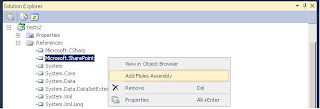
SharePoint is very powerful development platform, but it’s hard to test your code without changing it. It widely uses sealed classes, non-virtual and static methods and static properties, which make it impossible to mock its objects via popular free mocking frameworks: Rhino Mocks , Moq or NMock . However there is one free framework exists on the market. It’s called Microsoft Moles Isolation Framework and it can be plugged into Visual Studio 2008/2010 Professional Edition. To use Moles we need: 1) Download Moles x86 or x64 edition 2) Install it 3) Open your test project in Visual Studio 4) Add reference to Microsoft SharePoint library (and/or any other library you need) into your project 5) Select Microsoft.SharePoint in references list, open context menu and choose “Add Moles Assembly” After this step a new file Microsoft.SharePoint.moles will be added to the project. 6) Run Build command of the project. After build we should see new references added to the project: ...

Sharepoint 2007/2010 combined solution installer

What you'd do if you need a solution installer for both 2007 and 2010 Sharepoint? Well, I've found an interesting solution by Vojtech Nadvornik. In general, he modified code of well known codeplex solution . Actually, it has few minor imperfections, so I decided to make some refactoring. I changed Welcome page title and fixed Administration Service check (it didn't work on 2010). Binaries can be downloaded here and sources here . If you have any questions fill free to ask me here in comments - I'll try to answer ASAP.

Trim Sharepoint documents part 2.

As I wrote I came across the problem of uploading documents to sharepoint library which were downloaded from it before. The document content is created at sharepoint ok, but when I try to update metadata - sharepoint throws COMException (0x81071003). After digging in this problem it was found out that the document contains old data of content type within its custom properties. As I wrote in the previous topic - this problem can be solved by using ms office interop libraries, but this is the problem when you don't have ms office installed. I've found another good solution for the problem - DSOFile. It's a microsoft library which allows managing document custom properties. DSOFile.OleDocumentProperties dso = new DSOFile.OleDocumentProperties(); dso.Open(file, false, DSOFile.dsoFileOpenOptions.dsoOptionDefault); foreach (DSOFile.CustomProperty item in dso.CustomProperties) {     item.Remove(); } Library can be downloaded here http://support.microsoft.com/kb/224351 ...

Trim sharepoint's documents

I've come across a strange problem. I download a physical document from the sharepoint custom document library add this document back to the same library - it throw the error "Office document cannot be updated". When I add a document which was created not in the sharepoint - everything were ok. I've investigated deeply this problem and found that when you get a physical document from your custom document library it exported together with fields of the content type. These fields wrote into custom document properties of the document. I foung only one way to get rid of them - use microsoft COM library - word automation(Microsoft.Office.Interop.Word). object path = "Path to file goes here"; object missing = Missing.Value; object readOnly = false; object isVisible = false; object itemProp; Type typeItemProp; Word.Application wApp = new Microsoft.Office.Interop.Word.ApplicationClass(); Word.Document wDoc = wApp.Documents.Open(ref path, ref missin...