Posts

What’s under the hood of new Apps development for SharePoint 2013 Online?

So what’s inside this well-advertised approach? Actually, in terms of web development nothing new. It’s a web widget that: • Can be any of your web applications hosted in Azure, IIS, Apache etc. • Can be the same as above but hosted within an iframe embedded to a SharePoint page (App Part) • Can be an html code block with JavaScript and CSS being executed in user browser In addition, Microsoft renamed some of its existing functional pieces like list, libraries, application pages etc. to Apps which obviously confuse developers at start. I think the most useful change for developers is a new extended REST/OData service and Client-Side Object Model which enable external code in the Apps to interact directly with SharePoint artifacts. Another beneficial change is that SharePoint 2013 supports OAuth authentication which means that an App can interact with SharePoint on behalf of users once they have logged in and authorized the App. Useful links: Start building apps for Office an...
Unable to start Debugging.The SilverLight Developer Runtime Not Installed. Please Install a matching version

Today was my first day of professional development on Silverlight, but the start was not that easy. I was constantly getting the error message specified in the topic. Despite the fact that both Silverlight itself and SDK were of the final version this message was appearing over and over again. Finally, I found a useful suggestion of Alik Levin which resolved my problem. The post itself is here . The solution is to install Silverlight managed debugging package

System Account in Sharepoint2010?

You log in to Sharepoint 2010 using your account and see that it says welcome system account? :) Well, apparently, the application you logged in is using your account as application pool identity. To change this back you need to make just 2 steps 1). Change service account for your application pool to some different account using Central Administration-Security-Configure service accounts (it works only if you change it using Central Administration , don't even try to change it using IIS Manager - it doesn't work) 2). Make iisreset Voila !

Sharepoint 2007/2010 combined solution installer

What you'd do if you need a solution installer for both 2007 and 2010 Sharepoint? Well, I've found an interesting solution by Vojtech Nadvornik. In general, he modified code of well known codeplex solution . Actually, it has few minor imperfections, so I decided to make some refactoring. I changed Welcome page title and fixed Administration Service check (it didn't work on 2010). Binaries can be downloaded here and sources here . If you have any questions fill free to ask me here in comments - I'll try to answer ASAP.

Using WMI on Windows Server 2003

Image
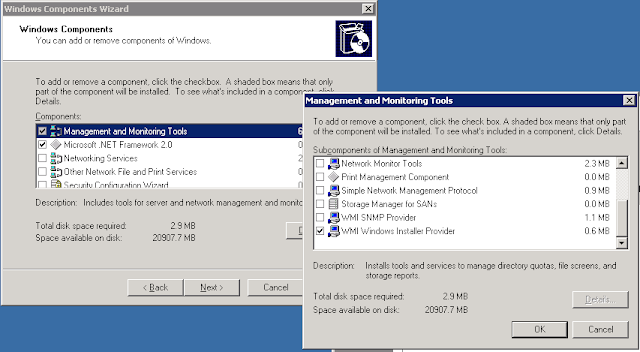
You might get "Invalid class" error when inquiring some information from Win32_SoftwareFeature, by calling WQL scripts like: "Select * From Win32_SoftwareFeature". As it turned out this feature is not installed by default on windows server 2003 and as result it gives you "Invalid class" when you call such scripts. It can be installed from add/remove programs - windows features:

Sharepoint 2010, solution installer

Obviously old solution installer for 2007 MOSS ( cool project on Codeplex ) doesn't work for 2010 Sharepoint. Luckily I found people who had worked on the same problem and found a solution . Andri proposes rebuilding solutions in .Net 4.0, but his solution also works with old wsp files. So just replace old Codeplex setup.exe with Andris one and that's it! Thanks to Andri for his solution. Btw seems this project will be popped up soon officially SharePoint 2010 solution installer Some update on this topic may be found here

XP + VS2008 + WebTest Recorder problems

Was trying to record a webtest script one day and found out that no record toolbar is opened when create a new webtest! Just XML Editor with one line of a code. I tried a lot of stuff, reinstalled studio, IE security things were tuned, but nothing helped. And finally when there was no any hope I found out that it is possible to do "Open with" and choose recorder as an option. For some reason XML Editor was set up as default editor for webtest files in Studio. I believe it was because previously I had Professional Edition installed (which doesn't contain webtest stuff) and afterwards I installed Team Suite edition.